For parents with busy kids
You don't have to hold it all.
Two schools, four teams, and every change lands on your phone. The coach texts. The school emails. The team app pings. The room parent needs an answer by tomorrow. And you are the only one who sees all of it.
Tell Dally once. She puts it on the right calendar, for the right kid, and keeps your family one step ahead.
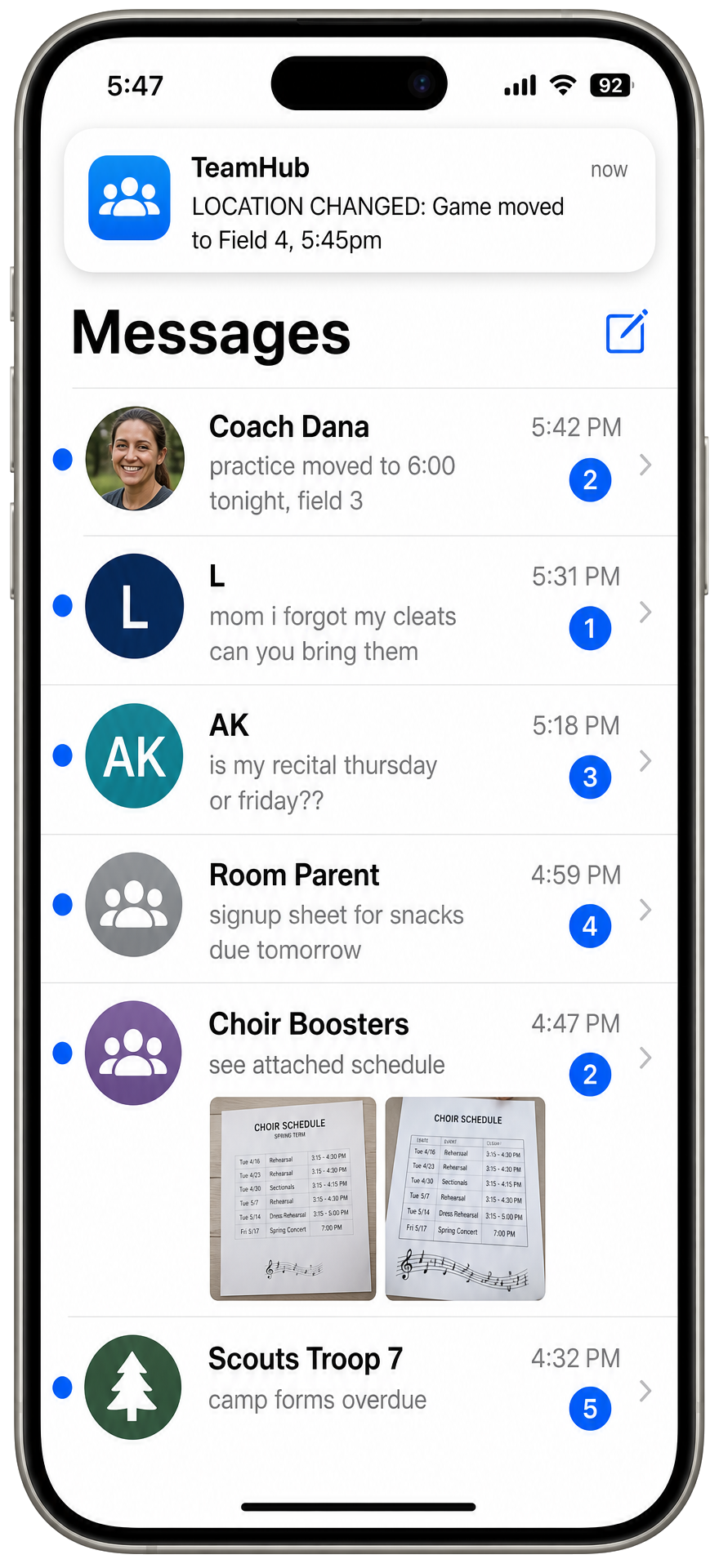
Everything comes through you.
A school email.
A paper from a backpack.
A coach's text.
A birthday invitation.
A changed practice time.
"We're out of shampoo."
And somehow you're expected to remember what each one means, who it belongs to, and when it matters. Miss one and it's a forgotten gift, a missed practice, a kid waiting at the curb.
You shouldn't have to be the family inbox.
The app pile
Every activity comes with another app.
- School portal
- Team manager
- League schedule
- Group chat
- Carpool thread
- Lunch account
- Band calendar
- Scout emails
- PTA newsletter
- Rec league site
Countless apps. Dozens of activities. One person holding all of it.
Meet Dally
Just tell Dally.
Text it. Snap it. See it sorted.
- Daily
- Calendar
- Tasks
- Shopping
- Meals
- Inbox
Practice moved to 6 tonight.
Calendar updated
[Photo of a birthday invitation]
Party added. Buy gift reminder set.
We're out of shampoo.
Added to Shopping
Everyone can tell Dally.
Your spouse. Your kids. A caregiver. They don't need the app or a login. Just Dally's number.

"I built Dally because I was tired of chasing schedules across five team apps, then walking in at 9pm after a ball game to find out we were out of milk again. I needed it all in one place.
I love the freedom to dilly dally, but it stopped being an option. So I made an app that lets me just tell Dally."
Leave your email and we will let you know the day Dally opens up.
I need DallyHow Dally works
Dally works in three steps. That's it.
Tell Dally
Link your calendars and tell Dally everything else via text.
Let Dally work
Dally will streamline your activities into one calendar and daily plan.
Enjoy simplicity
Get back to a place where you can dilly-dally when you want.
It's that simple.
Coming soon for iPhone.
Start the day already knowing.
Your Daily brings together what your household needs today without making you dig through a dozen apps.
- Today.
- Coming up.
- Needs attention.
- Tonight.
- Am I forgetting anything?
The Daily
Screenshot coming soon.
One household. One calendar.
School. Sports. Appointments. Family events. Dally keeps track of who each thing belongs to so everyone can see what's actually happening.
Calendar
Screenshot coming soon.
Less to think about.
Forms, fees, gifts, permission slips. The small things people mention in passing land in Tasks with who they belong to and when they are due. Finished ones clear themselves out.
Tasks
Screenshot coming soon.
Shopping
"We're out of that."
Send a text and it is on the list, in the right aisle, before anyone forgets.
We're out of milk and paper towels.
Both added to Shopping
[Photo of a receipt]
Kitchen stocked. Meal ideas ready.
Shopping
Screenshot coming soon.
Then order in seconds, not minutes.
One tap sends your list, with quantities, straight to the cart app you already use. Open Walmart or Instacart, drop the list in, and check out. No walking the house rebuilding a list you already made.
- Walmart
- Instacart
- Kroger
- Target
- Amazon Fresh
- Any notes or list app
Meals
Screenshot coming soon.
Dinner, without the 5 o'clock panic.
Text a photo of your receipt and Dally knows what is in your kitchen. It suggests meals from what you already bought, works around practice nights, and tells you the one thing you still need.
Prepared ahead.
Present now.
You don't organize family life so you can admire a perfect calendar. You do it so you're not thinking about Saturday while sitting at dinner on Thursday.
Dally takes care of the details that otherwise live in your head. That leaves more room for the people right in front of you.
Questions
Good to know.
Is Dally another family calendar?
No. Dally brings information from across your household together and turns it into the calendar events, tasks, shopping items, and reminders you actually need. She connects to the calendars you already use rather than making you start over.
Does everyone need the app?
No. Household members can simply text Dally from their own phones.
Can I send Dally a picture?
Yes. Send an invitation, school paper, or schedule and Dally pulls out the useful information.
What happens after the first setup?
Setup takes about two minutes: name your household, add the people in it, and save Dally's number. After that Dally works in the background, and you only open the app when you want to look at the week.
When is Dally available?
Coming soon for iPhone.
Is my family's information private?
Your household's information is yours. See our Privacy Policy for exactly what we collect, how it's used, and how to request deletion.
Tell Dally
You have enough to remember.
Leave it with me. No pressure, no commitment yet.
Coming soon for iPhone.
Know someone who needs this?
Send them an invite in a text. They can get on the list to meet Dally the day she opens.
What they will get
Finally a solution for parents who are tired of managing 6 different apps for their kids' schedules.
https://telldally.com/?ref=invite